


May 24, 2013

How to Debug Windows Store Apps on a Surface Tablet?

Today, I got my Microsoft Surface tablet. I rejoiced with a fist pump to the air, cracked my knuckles and said to myself “let’s build some apps!” I went to my dev machine (also running Windows 8 Pro), fired up Visual Studio 2012, created a new Blank Project template and was all ready to start [...]

Posted on October 27, 2012 by in How-to Guides, Windows 8

Today, I got my Microsoft Surface tablet. I rejoiced with a fist pump to the air, cracked my knuckles and said to myself “let’s build some apps!”

I went to my dev machine (also running Windows 8 Pro), fired up Visual Studio 2012, created a new Blank Project template and was all ready to start spitting some C# when it occurred to me.

How do I debug and test my apps on the Surface tablet? Sure, Visual Studio comes with an emulator to test the app on my PC, but this is 2012, I am done using emulators. I want to run it on the Surface! You can’t run Visual Studio on the Surface, since its a Windows RT only machine, it can’t run Visual Studio. It took a surprisingly long time of surfing through Microsoft’s documentation and the Dev Forums to find the answer to this question, and it’s actually quite easy:

How to debug Windows Store apps on your Microsoft Surface Tablet:

1.) Open up your Surface, and download onto it Microsoft’s Visual Studio 2012 Remote Tools for ARM.
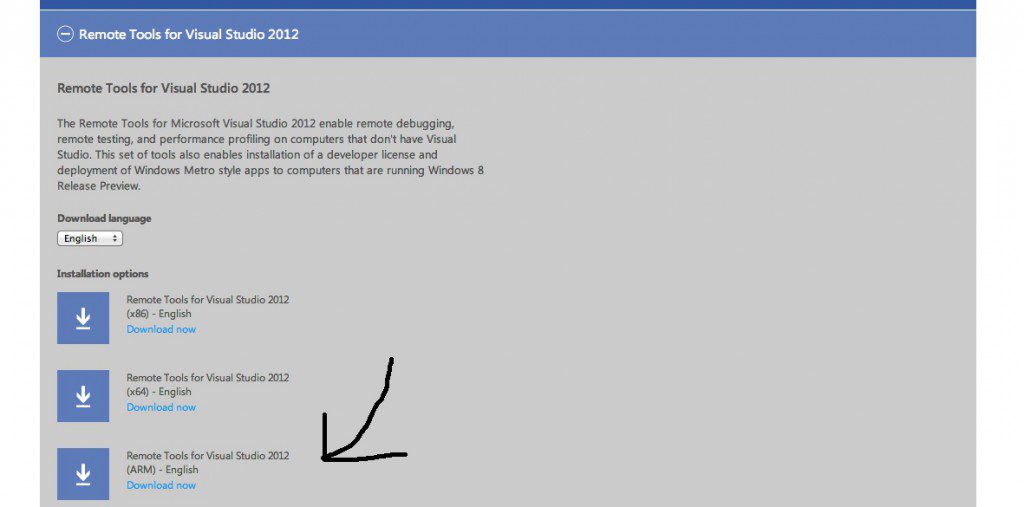
2.) Run the installer on your Surface tablet. You will be prompted to configure options related to the TCP port, the Authentication mode and idle time to use. If your Surface is connected to the same network as your dev machine, then you can disable authentication all together. (but don’t let your local IT Pro know you did that!)

3.) Go back to your dev machine, open up your Visual Studio project, and in the debug dropdown select ‘Remote Machine’
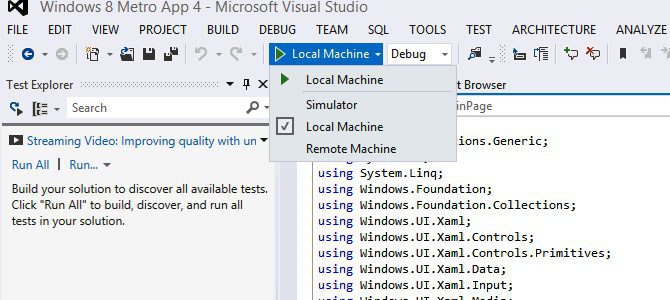
4.) Press ‘F5′ or the play button to start debugging.

5.) Switch back to your Surface, you will be prompted to request a new developer license. Click OK, put in your developer credentials and the Surface will handle the rest.

6.) And voila! Robert is your mother’s brother, your app should be running on your Surface tablet. You can set breakpoints and debug on your dev machine like your Surface was directly connected to it.

Happy coding kids.

Bobby Gill (64 Posts)

Bobby Gill is Editor-in-Chief of IdeaToAppster.com, author of "Appsters: A Beginner's Guide to App Entrepreneurship" and the founder of Blue Label Labs, a mobile development lab based in New York and Seattle. In addition to building its own apps, Blue Label Labs provides design and engineering services to mobile app clients across the world. Prior to starting Blue Label Labs, Bobby spent 4 years at Microsoft as a Program Manager within the Forefront Identity Manager (FIM) product group. During this time, Bobby served as an engineering and architectural lead for the FIM server specializing in database and web service design. After Microsoft, Bobby worked as a Summer Associate at McKinsey & Co. where he was part of a service operations enhancement program within the high-tech industry. Bobby holds a Bachelor of Mathematics specializing in Computer Science from the University of Waterloo and a Masters in Business Administration from Columbia Business School.


Tags: , , ,

  • Kevin

    Great article and very timely, thanks for doing the legwork on this!

  • Pingback: Jesper Hyldenbrandt Bjerre

  • Michal

    Can you run your own application on Microsoft Surface when debugger is disconnected? (without uploading to Microsoft Store)

    • http://www.oscial.com Bobby Gill

      Yes, I have run some of the apps I’ve been building without the debugger, and they launch on my Surface and operate as they should.

      • lq_msu

        Thanks for sharing and what are the steps for this?

  • Podge

    How can you run your own application on Microsoft Surface when debugger is disconnected? (without uploading to Microsoft Store)

  • Yashu

    Failed to install remote tools on my surface tablet?What to do?

  • http://Pcnordassistance.fr/ assistance a distance

    Hi there, I would like to subscribe for this blog to
    get most recent updates, therefore where can i do it please help.

  • Claude-Philippe Lievens

    Do you know the location where the app will be installed on the remote machine ? Can’t seem to find it…

    • omgbobbyg

      Metro apps are installed by default at C:Program FilesWindowsApps

  • http://twitter.com/RoarkDority Roark Dority

    I was not looking forward to figuring this out and reading about it on Microsoft’s site left me feeling overwhelmed and unsure what steps to take. This article, on the other hand, turned out to be Very, very helpful information.. Thank you, Thank you!! :-)

    • omgbobbyg

      Thanks, I’ll sleep better knowing I’ve helped at least one person!